 Gmail not receiving emails usually means the message already landed — in Promotions, Updates, Spam, or a filter — or the account is over the shared 15 GB quota and new mail is bouncing. Faraday is a Gmail client, so this is the same mailbox you would open in Faraday.
Walk it in this order: webmail first, then tabs and in:anywhere, then filters, forwarding, storage. If the phone is the only place it fails, it is sync, not Gmail.
Quick-fix checklist
1. Open gmail.com in a browser — not the app.
2. Search in:anywhere from:their@address.com.
3. Check Primary, Promotions, Updates, Social, Spam, and Trash.
4. Send yourself a test from another account.
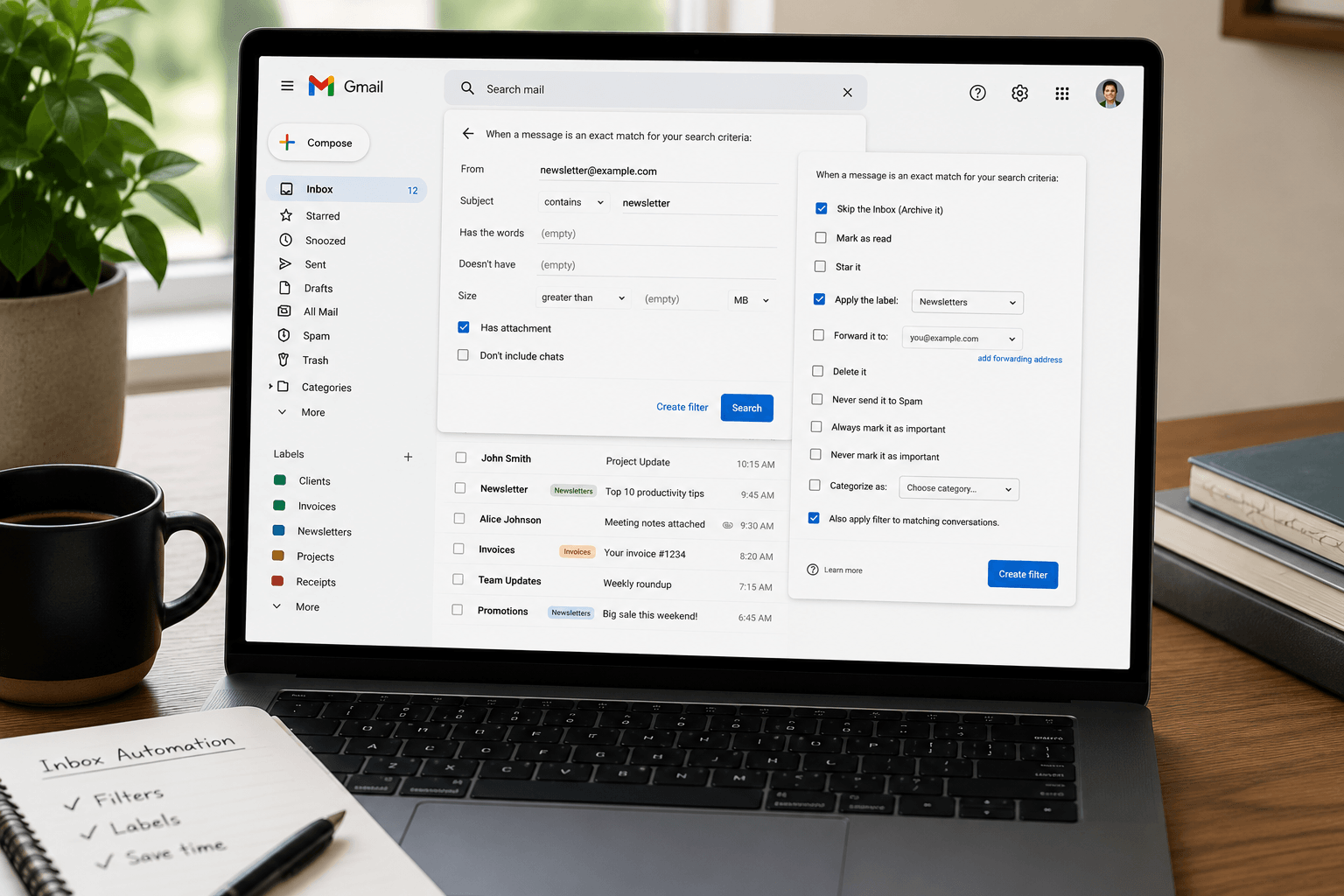
5. Open Settings → Filters and Blocked Addresses. Delete any filter that says Delete it or Skip Inbox for that sender.
6. Open Forwarding and POP/IMAP. Turn off forwarding you do not recognise.
7. Check storage at one.google.com/storage. If the bar is full, new mail cannot arrive.
8. If webmail has the mail and the phone does not, fix the Gmail app sync — the account is fine.
First, find out where it is broken
1. Open Gmail in a browser. If the message is on gmail.com, Gmail received it. The problem is a tab, a filter, or the app.
2. Search Mail & Spam & Trash. A normal search skips Spam and Trash. Click the search options arrow, set Search to Mail & Spam & Trash, or type in:anywhere plus the sender.
3. Send a test from another address. If it never appears anywhere, jump to storage, forwarding, and Google's status dashboard.
1. Check the tabs — Promotions, Updates, Social
Primary is not the whole inbox. Order confirmations, newsletters, and some bank mail land in Promotions or Updates and look like they never arrived.
On desktop: click each tab. To change which tabs you see, Settings → See all settings → Inbox → Categories.
On the phone: the Gmail app has the same labels in the left menu.
If a sender always belongs in Primary, open the message → Move to → Primary, and tick "Do this for future messages."
2. Spam, Trash, and All Mail
Open Spam. Mark genuine mail as Not spam. Gmail permanently deletes Spam and Trash after 30 days, so do this quickly.
All Mail includes archived messages that skipped the inbox. If you find it there, a filter with Skip Inbox is the usual cause.
3. Filters and blocked addresses
On a computer: Settings → See all settings → Filters and Blocked Addresses.
• Edit or delete any filter whose action is Delete it, Skip Inbox, or Forward it.
• Unblock the sender at the bottom of that same tab.
• A filter you made years ago will still fire. Look for the missing domain, not just the person.
Rebuild filters properly with the Gmail filters and labels guide.
4. Forwarding and POP
Settings → See all settings → Forwarding and POP/IMAP.
• If mail is forwarded to an address you do not recognise, disable forwarding, save, and change your Google password. That is a hijack pattern, not a glitch.
• If you do want forwarding, set Gmail to keep Gmail's copy in the Inbox.
• Under POP, if a desktop app downloads mail, tell Gmail to keep its copy in the inbox, and tell the app to leave messages on the server.
IMAP is always on as of 2025 — there is no enable-IMAP toggle to hunt for anymore.
5. A full Google storage quota
Gmail, Drive, and Photos share 15 GB. Spam and Trash count. When you are over quota, Gmail cannot receive: senders get a bounce, and the message is not waiting for you later.
Check one.google.com/storage. Empty Trash and Spam first, then delete large attachments with has:attachment larger:10M. Full walkthrough: Gmail storage full.
6. Gmail not receiving emails on iPhone or Android
If gmail.com has the mail and the phone does not:
• Pull to refresh, then force-quit the Gmail app.
• Confirm Notifications and Sync are on for that account (iOS: Settings → Gmail; Android: Gmail → the menu → Settings → your account).
• Remove the account from the phone and add it again.
• If you added Gmail inside Apple Mail or Outlook instead of the Gmail app, that client can be hours behind. Prefer the Gmail app, or a client that syncs IMAP properly — Faraday included.
7. Workspace / school / work accounts
If the address is @yourcompany.com on Google Workspace, an admin can block senders, hold mail in quarantine, or suspend receiving. Check the Workspace Status Dashboard, then ask IT. Consumer Gmail settings will not override an admin hold.
8. When the problem is on the sender's side
Ask them to check Sent. Typos in your address, their own bounce, or a bulk sender that failed Gmail's spam filters will never reach you. Have them resend without links or attachments first.
When it keeps happening
If mail is arriving but you cannot find it, the inbox model is the problem: five tabs, a Promotions catch-all, and filters you forgot you wrote. Faraday signs in with the same Gmail account and classifies humans, bills, bookings, and newsletters so the list you open is the list that needs you — not another tab hunt.
Where Faraday fits
Faraday connects to Gmail directly. No migration. Glance shows what needs you today. Follow-ups and compose assist run without a chat box. One-week trial. If storage is the actual blocker, free space first — Faraday does not add gigabytes. If delivery is fine and the inbox is not, Faraday is the client.
Why is my Gmail not receiving emails all of a sudden?
Usually a tab, a filter, forwarding, or a full 15 GB quota — not a Gmail shutdown. Search in:anywhere before you change anything else.
Why is Gmail not receiving emails on my iPhone?
If gmail.com has the message, re-add the account and check Gmail app sync. The mailbox is fine.
Why am I not getting verification emails in Gmail?
Search Promotions, Updates, and Spam for the brand name. Unblock the sender. Verification mail is often classified as Promotions.
Does a full Gmail mailbox stop incoming email?
Yes. Over-quota accounts bounce new mail. Empty Trash/Spam, then see Gmail storage full.
How do I search all of Gmail including Spam?
Type in:anywhere plus the sender, or set the search dropdown to Mail & Spam & Trash.
